The internet runs on email. Every signup, verification code, password reset, and B2B conversation flows through it. It has also served as an identity layer for the past thirty years and has become a standard in business communication. If you want your agent to act like a first-class citizen, you need an email inbox just for it.
Assuming you're running your AI agent through OpenClaw, NanoClaw, Hermes, or similar platforms, you'll eventually need to give it an email address depending on your use case. Without one, agents can't sign up for online services, receive verification codes, write to people or institutions, act as your assistant, or handle inquiries. This challenge is more common than it seems.
An agent without an email is like sending someone to run errands without an ID. Most digital doors remain closed if you don't have one.
So every person who manages AI agents arrives at the same end. How do I give my agent email access? And the obvious answer is Gmail.
What actually happens when you set up Gmail
It seems easiest to rely on the product you use every day, so you give your agent your Gmail credentials, or, better yet, set up OAuth access through the Gmail API. I did it too, so here's the simplified version of the experience.
First, you need to create a Google Cloud Console account. Then create a project. Enable Gmail API. Choose the scopes. Create an OAuth client ID. Fill in the app data, like app name, developer contact, since you're creating a workaround to access Gmail programmatically. Download a JSON file. Move it to a place where your agent can find it. Run the authorisation flow. Find yourself stuck cause it doesn't support headless browser authentication (I ran it in a VPS). Transfer tokens manually.
Reverted back and found the gogcli package that I can directly install into OpenClaw. Then I hit the wall cause I didn't have a Google Workspace service account. Then I found Gmail MCP, which I can use with my own Gmail account. And, luckily, after a hundred steps, your agent can now act on your behalf, pretending to be you.
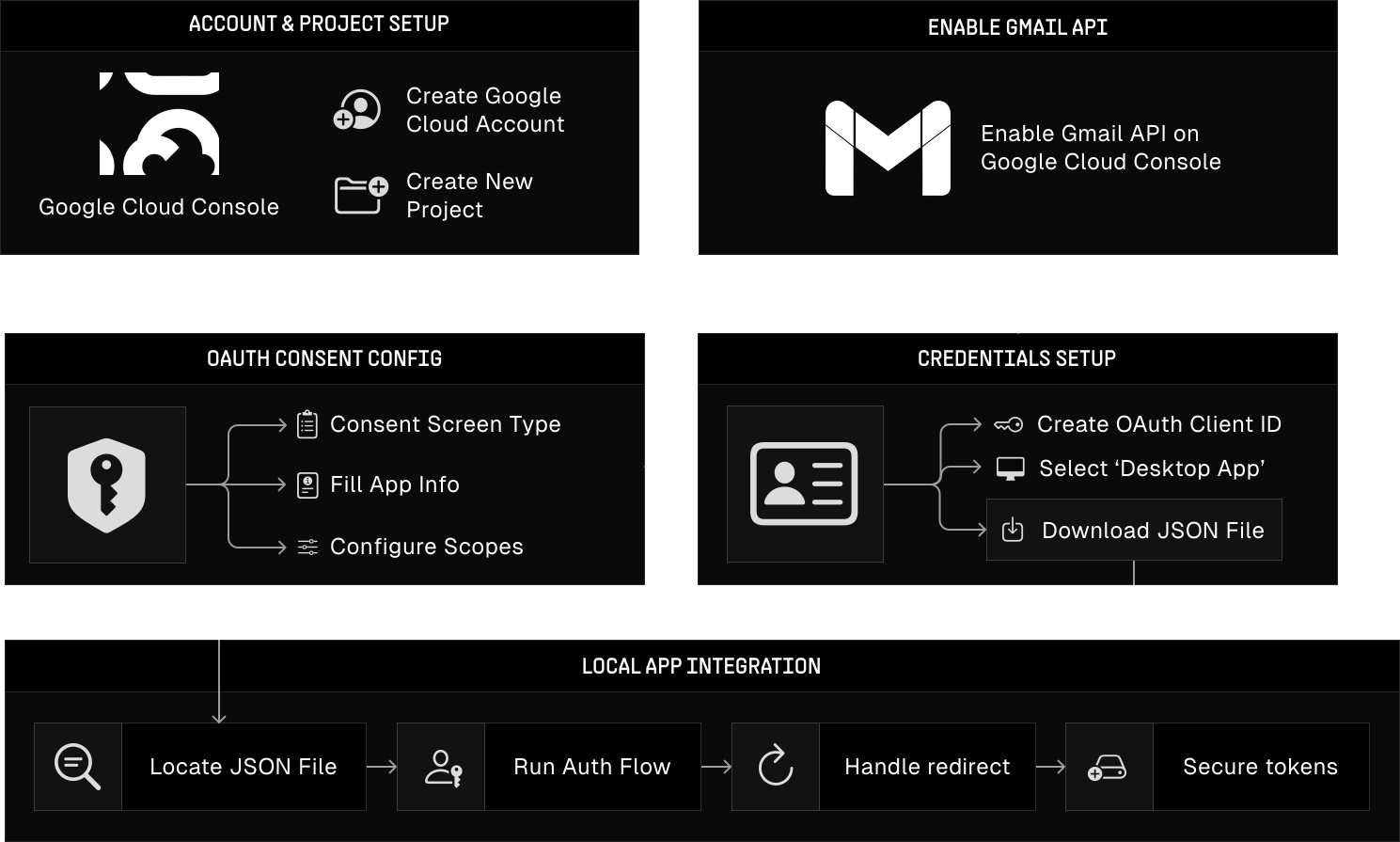
But let's say you pushed through and the connection works. Your agent can now read/receive emails or search the inbox using natural language. You might even wire up other Google services, like Calendar and Drive, while you're at it.
It works. For a while.
The limit discovery
Gmail's API uses a quota unit system. Sending one letter costs 100 units. Reading a letter costs you 5. In most cases, the limits are generous for basic usage, but if you plan to ramp up your sending volume, make sure you don't exceed the limits: 500 emails per day and 2000 for Google Workspace accounts. Exceed the cap, and sending is blocked for 24 hours.
Then there are bans…
Gmail was built for humans. Naturally, they designed their abuse detection to catch spammers. It doesn't know whether it's a spammer or just an AI agent that checks for email every 30 seconds. High-frequency mail polling, automated patterns, API calls at 3 AM with no browser activity. All seem like a red flag.
And with just one wrong move, you're risking your whole Google Workspace account being banned. Email, Calendar, Drive, Photos, everything that's tied to that identity.
This happened at scale two months ago (in February 2026), when Google permanently banned accounts for users who connected OpenClaw to Google services through OAuth. At least 25 users reported bans in a single GitHub thread (opens in new tab). Some were paying $250 for Google AI Ultra subscriptions. The company provided no warning, grace period, or refunds. After that, OpenClaw's creator removed Google Antigravity support from the codebase, from which most bans were connected.
Nonetheless, developers at Google are trying to push the agentic narrative and create tools for agents, e.g. Workspace CLI (opens in new tab), but it's not officially supported by Google yet.
It's clear that Google is not ready to have the discussion of what Gmail means for AI agents since their systems are still designed to treat agent behavior as abuse, and from their perspective, it still is.
The dedicated Gmail account doesn't help either
The next natural step is to create a dedicated Gmail account for your agent. If it gets banned, at least your personal account stays safe.
While this seems alright, new accounts are even more vulnerable because Gmail flags them immediately to detect emerging patterns that might indicate future abuse.
Recently, a developer posted on X (opens in new tab) that Google suspended their agent's email account after they had done almost nothing except check their email. They hadn't even sent a message yet, and, what's worse, the developers tried to address these issues in Google's own developer forum, where the thread was deleted within minutes.
On top of that, a Google Workspace account costs $7 per user (per agent) a month, so if you have 5 agents, that means $35 a month, and you still get the same OAuth complexity, ban risk, and your sending limit cap is locked until you spend $100 cumulatively and up to 75 days from the origin of the account.
So, what's the alternative?
None.
There are many mail providers that provide one thing or the other, but in reality, the choice is not available:
Take Proton Mail as an example. For most, based in the EU, it's a privacy-first choice, but it has no public REST API for email. There are public code repositories that expose their internal APIs, but these are undocumented, unsupported for third-party use, and designed for their own apps, not an official "here's your API key, go send emails" product.
However, there's a way to allow programmatic access to Proton Mail via their Proton Bridge desktop app, but that's fundamentally incompatible with a cloud-hosted agent and only allows sending 150 emails per day.
Microsoft Outlook seemed like a winner at the time of figuring them out - generous limits, API access, but the setup is designed to test your patience. Azure AD registration, admin consent, and scope permissions are similar to Gmail. Some developers report having their own throttling system that silently slows requests without explicit errors.
Resend was the most promising option. Clean API, great docs, easy to set up. The initial idea behind Resend was to enable developer-friendly access to send large volumes of marketing emails, but it fails to receive emails, respond to them, check for verification codes, or maintain threaded conversations. Resend and similar solutions, like SendGrid, Amazon SES, and Postmark, are purpose-built sending infrastructures.
It makes sense why. But today, they fail to solve the problem because they weren't built for it.
The user was always either a human or a clear, automated flow, allowed by specific infrastructures built around them; the AI agent is neither.
| Capability | Gmail | Proton | Outlook | Resend |
|---|---|---|---|---|
| Send | ✓ | ✓ | ✓ | ✓ |
| Receive | ✓ | ✓ | ✓ | — |
| Real-time events | ✓ | — | ✓ | ✓ |
| API access | ✓ | — | ✓ | ✓ |
| No ban risk | — | — | — | ✓ |
| Multi-agent scale | — | — | — | — |
Fig. 2 — Alternatives gap
And there's more
Consider what happens when you finally connect that Gmail account of yours.
Your agent is now capable of reading your inbox, every email you've ever received. Medical results, bank statements, private conversations, tax documents, the list goes on. If you're using a cloud-based model, it's probably training on all your personal information at the moment. Yikes. And to top it off, it probably has some sensitive scopes attached, like gmail.modify, that grant the agent permission to read, write, and delete every message and thread.
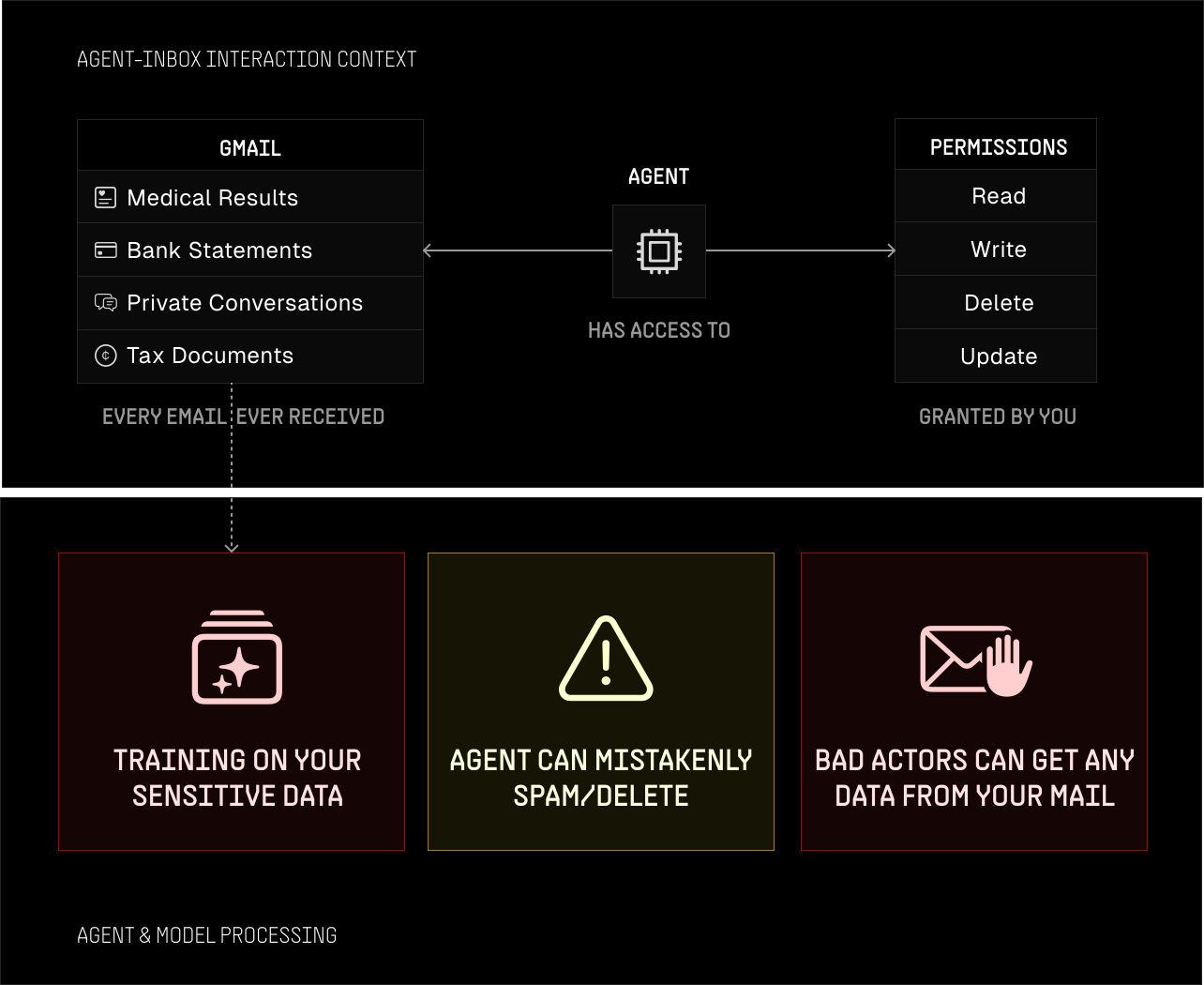
And again, one misstep, and it can cause catastrophic damage to your personal/work life, as it happened to Meta's AI alignment director (opens in new tab).
In other cases, if you run multiple agents on the same inbox, like one for checking your invoices and another for newsletter summarisations, they share access to the same inbox. The newsletter agent can now read and reply to emails that were intended for the invoice agent. There is no isolation. You cross-contaminate by default.
Then there's prompt injection. Anyone who discovers that your mail is run by an agent can send instructions embedded in the content to get your sensitive information or cause damage to your inbox.
It's easy to dismiss spam when you're human, but for an agent, the most phishy email could sound real. Researchers have demonstrated this (opens in new tab) working against MCP-connected Gmail servers as well.
And don't get me started on EU compliance, that's another gap that no one seems to have covered yet.
The state of things
The email is here to stay but its next phase of evolution is yet to be defined. The main providers are trying to catch up in weird ways, like releasing packages with no official support or workarounds by the community that most find them hard to trust. Gmail/Outlook/Proton still bans agents for behaving like spam accounts. Resend can send, but not Receive, the security surface and regulations deserve their own post to cover all the critical problems, and the security/compliance maze is another challenge itself.
This doesn't mean the state of things are in a bad shape. It means that the problem is still early enough to be solved properly.